PRACTICAL AGENTIC DEVOPS
How to Use AI Coding Agents with Terraform Without Apply Access
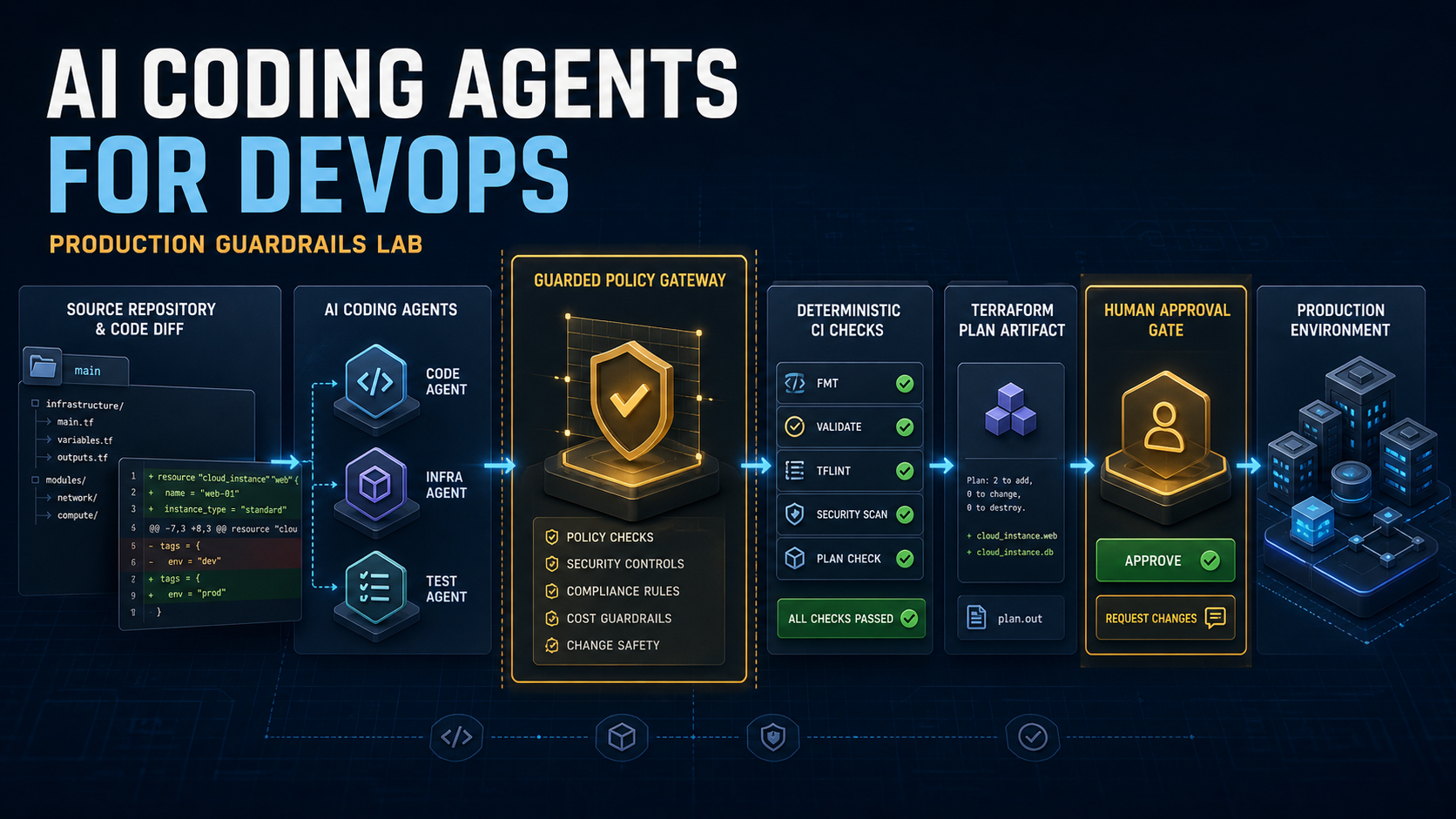
An AI coding agent can prepare a useful Terraform change without ever receiving the authority to apply it. The safe workflow is not “ask the model to be careful.” It is a repository and delivery design in which the agent can edit a bounded workspace, run deterministic checks and produce a saved plan, while production credentials and apply authority remain somewhere the agent cannot reach.
This guide gives an individual DevOps, platform or cloud engineer a practical plan-only pattern for Claude Code, OpenAI Codex or Gemini CLI. The same control model works across the three tools because the decisive boundaries live in the repository, execution identity and CI/CD path—not in the model's promise.
Define the result before granting access
Start with a change small enough to verify. A useful task contract names the files that may change, the commands that must pass, the evidence the agent must produce and the operations that are prohibited. For example:
task: add a validated change_ticket variable
allowed_paths:
  - terraform/demo/variables.tf
acceptance:
  - terraform fmt -check
  - terraform validate
  - terraform plan -out=review.tfplan
prohibited:
  - terraform apply
  - terraform destroy
  - state mutation
  - production credentials
The task is finished when observable checks pass and the requested evidence exists. “The agent says it is done” is not an acceptance condition.
1. Put the agent in a disposable workspace
Create a dedicated branch or worktree with only the repository content needed for the task. Do not inherit a shell session containing cloud tokens, kubeconfigs, production environment variables or a loaded SSH agent. A process that can read a credential may be able to disclose it even if a prompt says not to.
Terraform can also place sensitive material in state and plan files. HashiCorp's sensitive-data guidance explains that marking a value sensitive mainly redacts normal output; secure storage and access controls still matter. Keep real state, backends and cloud credentials out of a training or evaluation workspace.
A safe first lab can use Terraform's built-in terraform_data resource with no provider and no backend. That proves the control loop without proving access to a cloud account.
2. Keep one repository contract
Put shared working rules in a canonical AGENTS.md: scope, supported commands, prohibited operations, definition of done and required handoff. Thin tool-specific files can import or point to that contract instead of maintaining three divergent sets of rules.
OpenAI documents the discovery and scope of AGENTS.md instructions for Codex. Claude Code and Gemini CLI have their own instruction files and precedence rules, so recheck current vendor syntax before copying an example. The repository contract describes the workflow; it is not a security boundary by itself.
Include these minimum rules:
- the exact directories the agent may edit;
- the validation commands it may run;
- an explicit ban on apply, destroy and Terraform state mutation;
- a requirement to stop when credentials or unexpected generated files appear;
- a change summary with checks run, evidence and residual risk.
3. Make acceptance executable
Convert the task into checks that return a status code. For Terraform, the minimum local loop is formatting, initialization without a backend, validation and plan. HashiCorp documents that terraform plan reads the current configuration and state to propose changes; it does not make those changes unless the generated plan is later passed to apply.
terraform -chdir=terraform/demo fmt -check
terraform -chdir=terraform/demo init -backend=false -input=false
terraform -chdir=terraform/demo validate
terraform -chdir=terraform/demo plan \
  -input=false \
  -lock=false \
  -out="$temporary_plan"
Create the saved plan in a temporary directory and delete it after validation. Never commit plan files: they can contain configuration-derived and sensitive values. The CI log should record that a plan succeeded, not dump the plan's full content into a public artifact.
4. Enforce prohibited commands outside the prompt
A repository instruction can state “never apply,” but enforcement should have another layer. Use the coding tool's current hook or policy mechanism to deny risky Terraform subcommands and require an explicit human decision for other consequential tools.
Anthropic's Claude Code hooks reference describes lifecycle hooks and structured decisions. Codex exposes sandbox, approval and hook configuration; Gemini CLI exposes a policy engine with allow, deny and ask decisions. Those mechanisms evolve, so keep vendor adapters small and versioned. A shared deny script should normalize the command and reject at least apply, destroy, import, taint, force-unlock and state-changing operations.
Do not describe a hook as complete protection. Test quoting and wrapper cases, keep credentials absent, and ensure the execution identity cannot perform a production apply even if one layer fails.
5. Let CI verify the outcome independently
The agent should not be both implementer and final judge. Run the same repository Quality Gate in CI from a clean checkout. The ordinary job should need only repository read access, dependency installation and permission to publish non-sensitive test status. It should not receive deployment secrets.
For an infrastructure change, CI can verify:
- only allowed paths changed;
- the task contract is valid;
- no forbidden secret-like files or references were added;
- format and static validation pass;
- a local or appropriately isolated plan succeeds;
- the findings ledger has no unresolved severity-one or severity-two item.
If a real plan needs remote state or provider access, run it in a protected environment with a narrow identity. Do not expose that identity to untrusted pull requests or the general coding-agent workspace.
6. Separate plan review from apply
A successful plan is evidence, not approval. The reviewer should see the requested outcome, files changed, validation result, summarized plan effect, unresolved findings and rollback owner. Apply belongs to a separate human-controlled pipeline stage or established change process.
Use at least two identities:
- proposal identity: can edit the bounded branch and run safe validation;
- production identity: available only after branch protection, required review and environment approval.
The agent never receives the production identity. A reviewer deciding to merge is not automatically the same person or system authorized to apply.
7. Make multi-agent review converge
Claude, Codex and Gemini can review one another, but repeated open-ended review often creates an endless sequence of new preferences. Use one findings ledger keyed to stable acceptance criteria. Each finding needs an ID, severity, affected path, evidence, status and resolution.
Stop when the deterministic gate passes, no unresolved high-severity finding remains and no new evidence invalidates the task contract. A stylistic preference that does not violate an acceptance criterion belongs in a later improvement, not an infinite review loop.
Common failure modes
- “Plan-only” with cloud admin credentials loaded: the command policy is weaker than the reachable identity.
- A generic shell tool: the agent can bypass the intended Terraform wrapper.
- State and plan artifacts in Git: sensitive data can survive after the branch is deleted.
- CI reuses production secrets: verification and deployment authority collapse into one job.
- Prompt-only approval: natural-language input can imitate authorization.
- Three inconsistent instruction files: each tool receives a different definition of done.
If MCP tools are part of the workflow, also run the existing MCP security checklist for AI agent permissions. A read-only Terraform command does not make every connected MCP server read-only.
Plan-only release checklist
- The workspace contains no production credential, real state or persistent plan file.
- One canonical repository contract defines scope, commands and prohibited actions.
- Acceptance criteria are executable and return pass/fail without model judgment.
- Apply, destroy and state mutation are denied by a tested hook or policy layer.
- The execution identity cannot perform production changes.
- CI reruns the gate from a clean checkout without deployment secrets.
- Findings are recorded once and resolved against stable criteria.
- A human-controlled stage owns apply, monitoring and rollback.
Install the complete working lab
The AI Coding Agents for DevOps: Production Guardrails Course + Lab includes the complete repository contract, Claude/Codex hook, Gemini policy example, acceptance validator, secret preflight, findings ledger, local-only Terraform exercise and GitHub/GitLab CI examples. Use it to run the workflow rather than reconstructing each control from the article.
Rolling the pattern across multiple teams, repositories and managed identities is a different job. Cloudpeakify's AI Coding Agent Readiness Assessment covers enterprise identity, managed configuration, repository classes, audit evidence and controlled rollout.
Official sources
- HashiCorp Terraform: plan command
- HashiCorp Terraform: manage sensitive data
- Anthropic: Claude Code hooks
- OpenAI Codex: repository instructions with AGENTS.md
- Google Gemini CLI: policy engine
Watch the first lesson, then work through the course
Give a coding agent a task you can verify — free lesson 1 on YouTube ↗. The lesson is in English and uses a local exercise with synthetic data.
AI Coding Guardrails: all eight lessons and the original toolkit includes 2h 02m of English video and eight supplementary exercises. Continue through repository instructions, permission boundaries, a local Terraform plan, CI gates and the review handoff. The original eight written modules and four guided labs remain included; the eight video exercises are additional.
The download contains MP4 videos, a local HTML course library, transcripts, chapter markers and separate SRT subtitle files. Load the SRT files in a compatible player; the included HTML player has no subtitle switch. Review all eight lessons and prerequisites before choosing the course.