OPERATIONS · RECORDED LAB
How to test an n8n backup before upgrading
Before an n8n update, rehearse the route back to a working installation. This walkthrough shows what we checked in a real, same-version SQLite restore—and the failures a workflow comparison can and cannot reveal.
We created a small n8n installation with synthetic workflows and a dummy credential, stopped it, backed up its data, and restored it into a separate directory. We then ran the unchanged checker from the Recovery Drill Kit against actual n8n exports. The results below come from that exercise.
1. Define what you need to recover
Start with one installation and write down its database, encryption-key source, data directory, binary-data storage, installed community nodes and exact n8n version. Add the workflows that matter and a harmless way to exercise them after recovery. A list of workflow names alone does not describe everything the installation needs.
n8n provides CLI commands for exporting workflows and credentials. Workflow exports are useful for inspecting structure and comparing versions. Restoring a database, recovering a credential and replaying an external business action are separate checks.
Keep the encryption key with an appropriately protected recovery plan. n8n uses it to encrypt stored credentials; its encryption-key documentation explains how the generated or configured key is used. The sample in this article contains no production credentials.
2. Separate the rehearsal from your live automation
Use a new data directory and a different local endpoint. Do not point the test process at the production database. Use synthetic records and inactive workflows so the rehearsal cannot repeat emails, payments, scheduled jobs or customer webhooks. This lab used local test data and loopback-only services.
Record the isolation you actually have. A loopback listener and application-level network restrictions are not a container or a kernel network boundary. Our lab report describes its controls; it does not claim to test a Docker deployment.
3. Restore first, then inspect the exports
For this SQLite exercise, the source was stopped before its data was copied. The backup was restored into a separate target, using the same n8n version and the original encryption-key material. Do not apply this stopped-instance copy procedure to a live database or assume it covers PostgreSQL, external binary storage or queue workers. Use the official backup and restore guidance for the deployment you operate.
Export workflows from the source and the restored target using n8n, then point the kit at those exports. The examples below assume you are in the kit's directory and have saved the two exports as before.json and restored.json.
python3 "tools/recovery_check.py" inspect "before.json"
python3 "tools/recovery_check.py" compare "before.json" "restored.json"
The inspector reads workflow identities, node structure, connections and credential references. The comparator checks supported workflow content, including parameters. It does not connect to n8n or execute the restore. Keep export files and full reports private: real workflow exports can contain embedded values and business data.
4. Check the successful restore and deliberate failures
| Check | What we did | Observed result |
|---|---|---|
| Restored data | Copied the complete data folder after a clean stop, then started a separate same-version instance. | Backup and restored-copy hashes matched before startup; the restored instance became ready. |
| Workflow comparison | Exported workflows from the actual source and restored n8n installations. | Checker exit 0: semantic_match. Metadata warnings remained; recovery_verified stayed false. |
| Restored execution | Executed the harmless two-node workflow against a local HTTP endpoint. | n8n CLI exit 0 for both the source and the restored workflow. |
| Credential usability | Authenticated from the restored workflow with the copied encrypted dummy credential. | The local endpoint accepted the restored credential; its value was not included in the report. |
| Deliberate parameter change | Edited the HTTP timeout in a local copy of the real restored export, from 5000 to 4999. | Checker exit 1: semantic_difference in the nodes section. This edited file was not a fresh n8n export. |
| Missing original key | Removed the original key configuration from another scratch copy, then exported and executed its workflow. | Workflow comparison still matched. Actual execution failed to decrypt the credential and made no new HTTP request. |
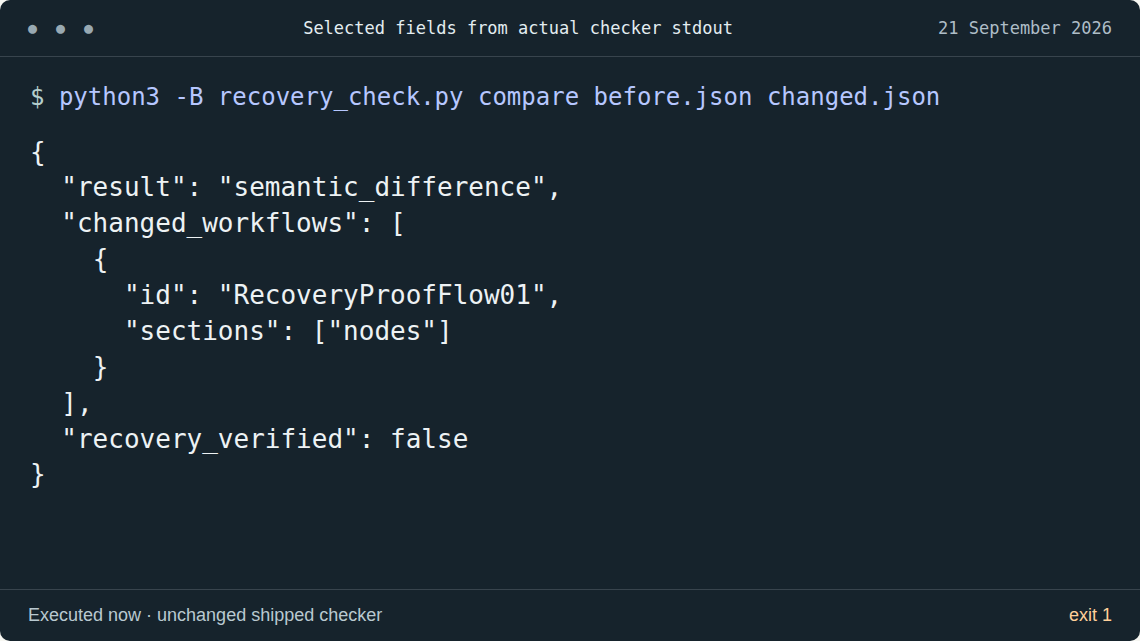
The real exports also triggered warnings for newer, unrecognized workflow metadata and an omitted credential inventory. We kept those warnings in the record. Exit zero and a semantic match do not mean that every exported field was compared or that credential inventory was checked.
Credential recovery was checked separately from workflow comparison. A workflow can retain the same credential reference while the target cannot decrypt the stored credential. The kit intentionally leaves recovery_verified set to false, even when supported workflow content matches.
Tested 2026-09-21: n8n 2.39.9, Node.js 24.21.0, Linux, SQLite and synthetic data. One inactive two-node workflow, one encrypted dummy credential and a local HTTP endpoint; a stopped data-folder copy into a separate same-version instance. PostgreSQL, Docker volume recovery, queue mode, external providers and arbitrary n8n upgrades are outside this test.
5. Decide what is ready and what still needs a test
Write down the source version, restore target, backup boundary, observed differences, credential result and workflow execution result. Keep the failure cases with the successful result. Decide which remaining gaps block your own update. Matching exports are one piece of that decision.
This exercise demonstrates a same-version recovery. It does not prove a migration from one n8n release to another. Before a version upgrade, review the relevant n8n update guidance and test that exact version pair with a copy of your own deployment's relevant data.
Likewise, a successful harmless test workflow does not verify every production workflow, custom node, binary attachment, permission or external system. Those checks belong in the recovery record for your installation.
Questions before you start
Can I use the checker without an n8n account or API key?
Yes. It reads local workflow-export JSON with Python's standard library. You supply exports you are authorized to inspect.
Does a matching report mean my backup is safe to use?
It means the parts compared by the checker match. You still need evidence for credentials, execution, storage and the rest of your recovery scope.
Do these results cover Docker or PostgreSQL?
No. This published exercise covers the exact Linux, SQLite and n8n version shown above. Use your own isolated test to validate different deployment modes.
Related: Review permissions for AI tools · Cloudpeakify resources.